I feel awkward glancing at my phone while I’m giving a tour. I’m only checking the time, but it still feels a little rude to the people standing in front of me, listening.
I wanted to keep my eyes on the visitors and feel a buzz in my hand when it was nearly time to move on. Mostly, though, I thought it would be fun to make something like that myself. So I built a vibrating timer for the M5Stack StopWatch.
I could wear a watch and keep an eye on the time. I’m not sure I trust my sense of timing enough to give each exhibit its share, though. And whether it’s a phone or a watch, I’d still have to keep checking it while I talk.
I could also set alarms before the tour. Say someone asks a question just as I’m wrapping up at one exhibit, and we spend a little longer talking. Now I have to rush through the next stop to catch up.
An alarm set to a fixed schedule leaves little room to improvise.
A new time allowance at each stop
Tour Pacer shows two countdowns. The large digits in the middle tell me how long I have until the end of the tour. The smaller countdown below, labeled 「今回の目安」, is my time left at this stop.
The outer ring shows the time left for the whole tour. As time passes, the color recedes clockwise from twelve o’clock. The stops on the route are arranged clockwise around the inner ring. At the current stop, a lime-green arc shrinks in the same direction, starting at the beginning of that segment.
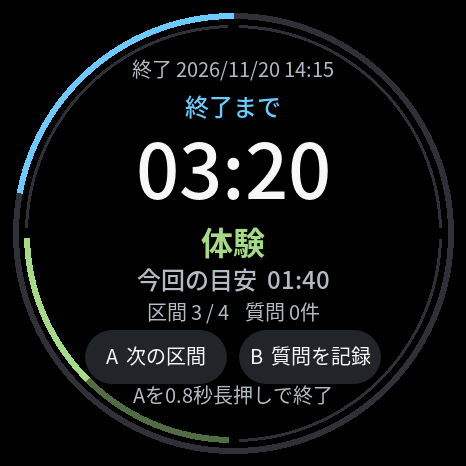
When I set an end time and start the tour, the timer reads its built-in clock and displays the time until the tour ends. From then on it measures elapsed time in milliseconds and subtracts it from the time I had at the start.
When I’m ready for the next exhibit, I give button A a quick press. The timer divides the time still available among the remaining stops in proportion to their usual lengths. If I spent longer answering a question, I get less time at the next exhibit. If I wrapped up early, I get a little more. At the last stop, I can use all the time that’s left.
Even when the countdown for a stop reaches zero, I still get to decide when we move on.
What happens when two alerts coincide?
One short buzz means my time at this stop is nearly up. Three short buzzes mean I’ve used it all. For the tour as a whole, I feel two buzzes when we’re getting close to the end and one long buzz at the end time.
If two alerts fall at the same moment, I feel only the one for the whole tour. Once I’ve had the warning that the tour is nearly over, the timer skips any further warnings that a stop is nearly over. It still gives three short buzzes when a stop reaches zero, provided there’s time left on the tour and the buzzes don’t coincide with a tour alert.
Even while the device is vibrating, I can give button B a quick press to record which stop I was at when someone asked a question, along with the time.
On each pass through the main loop, the timer reads the buttons and uses the time elapsed since the vibration pattern began to decide whether the motor should be on or off. The same loop keeps checking for button presses throughout a series of short buzzes.
Using it for a presentation
If I have a 15-minute speaking slot, I can set 「持ち時間」 (time allotted) to 15 minutes on the device. It stays at 15 minutes while I wait my turn. When I start speaking, I press 「計時を開始」 (start timer) to begin the countdown. That works even if I don’t know exactly when my slot will end.
I can also split the slot into 12 minutes for the talk and three for questions. To set both the total time and the split in one go, I connect the device to my computer with a cable and send it a JSON configuration file. I can also connect to the device’s Wi-Fi and edit the settings in a browser on my phone or computer.
If I know the schedule in advance, I can put it in the file ahead of time. If it changes at the last minute, I can adjust it on my phone.
Want to try it?
I’ve put the source code on GitHub, along with instructions for flashing the device from Windows, macOS, or Linux. If you have the hardware, give it a try. I’d love to hear how you get on.